О проекте
Команда: aigaalac
Кейс HackAlem.ai: Спецтрек — Astana Innovations
Стадия: Доведённый продукт
Задача кейса: «Аким на 5 часов»: городской симулятор, распределяющий бюджет по 5 направлениям и 5 районам
Суть
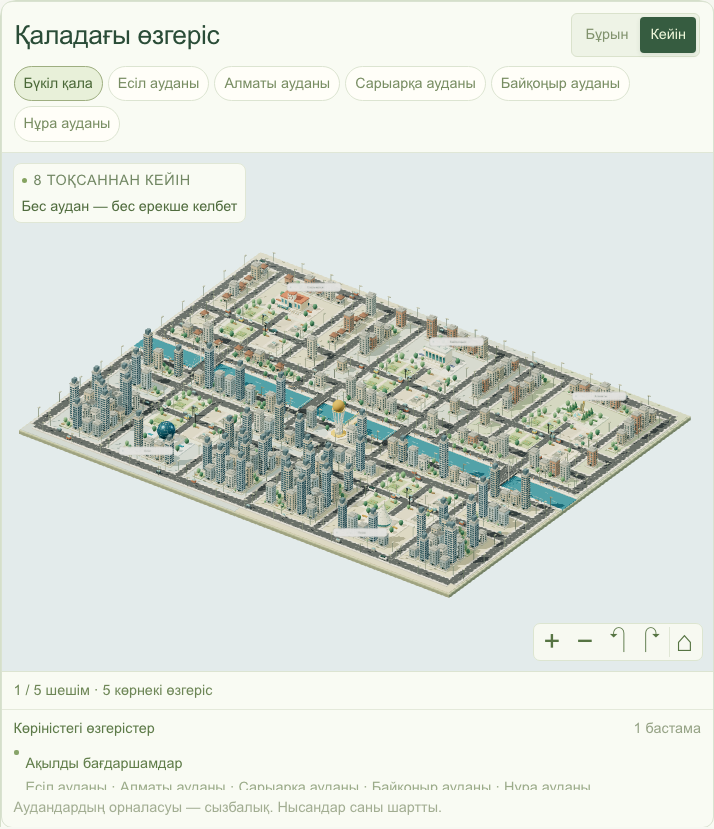
Казахоязычный симулятор управления Астаной: игрок распределяет бюджет в 100 единиц на 5 проектов по 5 районам и видит итоговое качество жизни в интерактивной 3D-модели города, а AI объясняет результат на казахском.
Как устроено
Данные районов и 14 проектов лежат в локальных JSON. lib/score.ts детерминированно валидирует план (ровно 5 проектов по одному на категорию, несовместимые пары) и считает эффект с учётом задержек за 8 кварталов и бонусов синергии. Итог: 0.7 × средневзвешенный по населению балл + 0.3 × минимальный балл района − число метрик ниже 40. POST /api/analyze на сервере перепроверяет решения и просит gpt-4o-mini объяснить цифры (таймаут 35 с, без ключа статус unavailable). 3D-город на Three.js, сравнение сценариев A/B в браузере.
Ключевые решения
- детерминированная формула скоринга
- лаги реализации и синергии проектов
- серверная валидация плана
- AI-объяснение без изменения чисел
- Playwright e2e
Особенности
Формула итога учитывает справедливость: 30% веса у самого слабого района и штраф за каждую метрику ниже 40. AI только объясняет посчитанные числа. Есть воспроизводимый эталонный сценарий (52.56 → 55.61) для проверки жюри.
Стек
Next.js 14 · React 18 · TypeScript · Tailwind CSS · Three.js · Playwright · Vercel
Модели
OpenAI gpt-4o-mini · OpenAI gpt-4o
Проект создан за 5 часов на финале хакатона HackAlem.ai (23 сентября 2026, Астана). Код — BAITC-Hacks/hack-7859a9cd-aigaalac.
README
README.md5 сағатқа әкім · Mayor for 5 Hours
A Kazakh-language city management simulator for Astana. Spend a 100-unit budget, choose five projects, and see how your decisions change the city’s quality of life and its interactive 3D model. AI explains the calculated results in Kazakh.
Hackathon prototype: all district statistics, costs, and effects are synthetic. The city model is schematic, not a geographic map. “Five hours” is the game’s name; the simulation covers eight quarters and has no countdown timer.
Use the repository root. The current project contains
app/,components/,lib/, andpackage.jsonhere. If your local checkout includeshack-7859a9cd-aigaalac/inside it, that is an ignored copy of the previous project; do not run or deploy that nested folder.
Run locally · Deploy to Vercel · Demo walkthrough · Tests
What you can do
- Explore five districts: Есіл, Алматы, Сарыарқа, Байқоңыр, and Нұра.
- Choose from 14 projects across transport, environment, social infrastructure, safety, and city services.
- Watch projects appear in the 3D city, focus on a district, and switch between before/after views.
- See budget, district metrics, implementation delays, and project synergies.
- Confirm a plan to receive a deterministic quality-of-life score and an AI explanation.
- Edit a plan and save scenarios A/B for comparison in the same browser.
- Use the simulator on desktop or mobile; district information remains available if WebGL is unavailable.
Run locally
Requirements: Node.js 22.18 or later and npm. Node.js 22 is a suitable choice for reproducing this project.
git clone https://github.com/BAITC-Hacks/hack-7859a9cd-aigaalac.git
cd hack-7859a9cd-aigaalac
npm ci
cp .env.example .env.local
npm run dev
Open http://localhost:3000. If you already have the project checked out, run the commands starting with npm ci from its root.
The interface, 3D city, scoring, and A/B comparison work without an API key. To enable AI explanations, edit .env.local:
OPENAI_API_KEY=your_openai_api_key_here
OPENAI_MODEL=gpt-4o-mini
| Variable | Required? | Purpose |
|---|---|---|
OPENAI_API_KEY | Only for AI explanations | Server-side API credential; the API account needs available quota. |
OPENAI_MODEL | No | Defaults to gpt-4o-mini. This implementation also accepts gpt-4o. |
Restart the development server after changing environment variables. Keep .env.local private: it is ignored by Git. Never give the key a NEXT_PUBLIC_ prefix or put it in browser code.
To run the production build locally:
npm run build
npm start
Deploy to Vercel
This section is a deployment tutorial. No hosted deployment is required to run or review the repository locally.
The app requires a Next.js server runtime for POST /api/analyze; do not deploy it as a static HTML export. No database or separate backend service is needed.
Option 1 — Vercel dashboard
-
Push the current project to a GitHub repository that your Vercel account can access.
-
Sign in at Vercel, choose Add New → Project, and import the repository.
-
Configure the project:
Setting Value Framework preset Next.js Root directory Repository root ( ./); leave the default root selectedInstall command npm ciBuild command npm run buildOutput directory Leave the Next.js default; do not override it Node.js version 22.x -
Under Environment Variables, add
OPENAI_API_KEYfor Production if AI explanations are needed. Add it for Preview too if you want AI in preview deployments. Optionally addOPENAI_MODEL=gpt-4o-mini. Enter the values without surrounding quotes. These variables must be configured on Vercel; your local.env.localis not the hosted configuration. -
Click Deploy. When the build finishes, open the URL Vercel provides.
-
Run the demo walkthrough. Confirm the home page loads, project selection works, and submitting the reference plan returns 55.61. With a working key, the result also includes a Kazakh AI explanation; without one, the score still works and the app reports that AI analysis is unavailable.
If the organization repository is missing from the import list, ask its owner to enable Vercel access, or use the CLI method below to deploy your local checkout to your own Vercel project.
After changing hosted environment variables, redeploy to apply them. A connected Git repository can trigger subsequent deployments when you push changes.
Option 2 — Vercel CLI
Run these commands from the project root:
npx vercel@latest login
npx vercel@latest link
Choose your account/team, create or select a project, and use ./ as its source directory. Set the project’s Node.js version to 22.x in Vercel’s project settings.
If you need AI explanations, add the key through the interactive prompt:
npx vercel@latest env add OPENAI_API_KEY production
Then deploy:
npx vercel@latest --prod
Open the production URL printed by the CLI and follow the demo walkthrough. Repeat the final command after local changes to publish a new version. Never commit .env.local or paste a real API key into the README.
Official reference: Deploying with the Vercel CLI and Next.js on Vercel.
Demo walkthrough
-
Open the app. The baseline city score is 52.56, and the available budget is 100.
-
Select the following projects and assign the specified districts:
ID Project District / scope Cost M1 Dedicated bus lanes Нұра 18 M5 Cleaner fuel for private housing Сарыарқа 25 M7 School and kindergarten Нұра 24 M10 Street lighting and cameras Нұра 12 M12 Unified resident requests platform Whole city 14 -
Check that total cost is 93, with 7 remaining. Click «Растау» (Confirm).
-
The final score is 55.61, an improvement of +3.05. Нұра’s district score changes from 49.18 → 53.13. The number of critical metrics falls from 2 → 1; Нұра’s healthcare metric remains 35. The M10 + M12 synergy improves Нұра’s street safety.
-
Save the result in A, click «Жоспарды өзгерту» (Edit plan), move the school to another district, and confirm again. Save the new result in B to compare the plans.
-
Use the city’s before/after controls to inspect the project changes. «Қайта бастау» (Restart) clears the current choices; saved A/B plans have separate delete controls.
A/B plans are saved in the current browser, not in a shared account or server database. Saving or comparing them does not make an AI request.
Current game rules and scoring
- Spend no more than 100 units; unspent budget gives no score bonus.
- Select exactly five distinct projects: one from each of the five categories.
- Assign one district to each district-level project. City-level projects affect all five districts and are paid for once.
- M1 and M3 cannot be combined. M4 + M7 and M5 + M13 cannot share a district.
- Invalid plans cannot be confirmed; the server independently validates all decisions before calling AI.
Each metric is on a 0–100 scale, where higher is better. Project effects are adjusted for implementation delays over an eight-quarter horizon. Fixed synergy bonuses are then included, and metrics are clamped to 0–100.
realized project effect = full effect × (8 − delay in quarters) / 8

district score = weighted sum of the district's ten metrics
city average   = population-weighted average of district scores

final score = 0.7 × city average
            + 0.3 × lowest district score
            − number of district metrics strictly below 40
AI explains the numbers; it does not calculate or change them. If the provider fails or the key is missing, the API still returns the real simulation result with analysis.status = "unavailable". An AI request times out after 35 seconds; retrying analysis is a user action.
See scoring and dataset details and 3D city documentation.
Project structure
The stack is Next.js 14 App Router, React 18, TypeScript, Tailwind CSS, and Three.js. District and project data live in local JSON files.
app/page.tsx              Loads the catalog and renders the simulator
app/api/analyze/route.ts   POST endpoint: validation, scoring, AI explanation
components/               Simulator, 3D city, district views, A/B comparison
lib/score.ts              Deterministic game rules and score calculations
lib/analyze.ts            Coordinates scoring and optional AI analysis
lib/openai.ts             Server-side AI request and response validation
lib/data.ts               Local JSON data adapter
lib/city-*.ts              City geometry, layout, landmarks, and visual state
data/                     District metrics and the 14-project catalog
tests/                    Unit tests and desktop/mobile Playwright tests
docs/                     Scoring reference, 3D documentation, screenshots
API
Send project IDs and district IDs only. Costs, effects, and scores are read or calculated on the server.
curl -X POST http://localhost:3000/api/analyze \
  -H 'Content-Type: application/json' \
  -d '{"decisions":[{"actionId":"M1","districtId":"nura"},{"actionId":"M5","districtId":"saryarka"},{"actionId":"M7","districtId":"nura"},{"actionId":"M10","districtId":"nura"},{"actionId":"M12"}]}'
Omit districtId for city-level projects. District IDs are esil, almaty, saryarka, and baikonur, plus nura.
| Status | Meaning |
|---|---|
200 | { result, analysis }; AI status is complete or unavailable. |
400 | Invalid JSON, unexpected fields, or an invalid plan. No AI call is made. |
413 | Request body exceeds 4,096 characters. |
500 | Server-side data loading or simulation failure. |
Tests
npm test                 # Unit tests for rules, scoring, AI handling, and city logic
npm run typecheck        # TypeScript checks
npm run build            # Production build and Next.js validation
For desktop and mobile browser tests:
npx playwright install chromium
npm run build
npm run test:e2e
Playwright starts its own production server at 127.0.0.1:3010; keep that port free. The test server uses an empty API key, so it makes no paid AI requests. Browser-test artifacts are written to test-results/.
Troubleshooting and limitations
| Problem | What to check |
|---|---|
| AI analysis unavailable | Check OPENAI_API_KEY, API quota, and the allowed OPENAI_MODEL values. Restart locally or redeploy after changing variables. The score remains usable. |
| Vercel builds the wrong app | Select the repository root, not the nested copy of the previous project. |
| Production server will not start locally | Run npm run build before npm start. |
| Port 3000 is busy | Run npm run dev -- --port 3002 and open http://localhost:3002. |
| 3D city does not render | Enable browser hardware acceleration/WebGL, or use the district information and results without 3D. |
| Saved A/B plans disappeared | They belong to the browser and origin where they were saved. Clearing browser storage removes them. |
This prototype has no accounts, shared leaderboard, server-side saved sessions, random city events, or presentation export. It retains Next.js 14 from the hackathon implementation. Before a long-term public deployment, review npm audit, upgrade to a supported patched Next.js version, and rerun the checks; a hosting platform may reject a dependency version with known vulnerabilities. The AI endpoint currently has no authentication or application-level rate limiting.
Авторы коммитов
История коммитов
- 2026-09-23 17:51last commitakbope
- 2026-09-23 17:45last commitakbope
- 2026-09-23 17:21Resolve merge conflicts and fix strategy stateShahnaz-aitu
- 2026-09-23 17:19Fix simulation data integrationmollesskin
- 2026-09-23 17:12updateShahnaz-aitu
- 2026-09-23 17:08Implement city simulation enginemollesskin
- 2026-09-23 16:32ozgerister, til, apiakbope
- 2026-09-23 15:39frontendShahnaz-aitu
Все коммиты (14)
- 2026-09-23 14:59frontend UIShahnaz-aitu
- 2026-09-23 14:13rettelgen 2+3akbope
- 2026-09-23 14:07Merge branch 'main' of https://github.com/BAITC-Hacks/hack-7859a9cd-aigaalacmollesskin
- 2026-09-23 14:03Ignore local environment variablesmollesskin
- 2026-09-23 13:59data+aiakbope
- 2026-09-23 13:57Initial Akim Simulator project structuremollesskin
Структура репозитория (56 файлов)
.env.example
.gitignore
README.md
app/api/analyze/route.ts
app/globals.css
app/layout.tsx
app/page.tsx
components/city-art.tsx
components/city-scene.tsx
components/city-view.module.css
components/city-view.tsx
components/district-explorer.tsx
components/icon.tsx
components/scenario-comparison.tsx
components/simulator-workspace.module.css
components/simulator.tsx
data/actions.json
data/districts.json
docs/city-3d.md
docs/scoring.md
docs/screenshots/city.png
docs/screenshots/comparison-desktop.png
docs/screenshots/comparison-mobile.png
lib/analyze.ts
lib/city-batching.ts
lib/city-focus.ts
lib/city-geometry.ts
lib/city-landmarks.ts
lib/city-layout.ts
lib/city-visuals.ts
lib/data.ts
lib/district-identities.ts
lib/districts.ts
lib/labels.ts
lib/openai.ts
lib/score.ts
lib/types.ts
next-env.d.ts
next.config.mjs
package-lock.json
package.json
playwright.config.ts
postcss.config.mjs
tailwind.config.ts
tests/analyze.test.ts
tests/city-batching.test.ts
tests/city-layout.test.ts
tests/city-visuals.test.ts
tests/districts.test.ts
tests/e2e/city-3d.spec.ts
tests/e2e/city-development.spec.ts
tests/e2e/district-identities.spec.ts
tests/e2e/live-workspace.spec.ts
tests/e2e/simulator.spec.ts
tests/score.test.ts
tsconfig.json
Ветки (2)
Обсуждение 0 комментариев
Войдите, чтобы комментироватьПока нет комментариев — будьте первым.